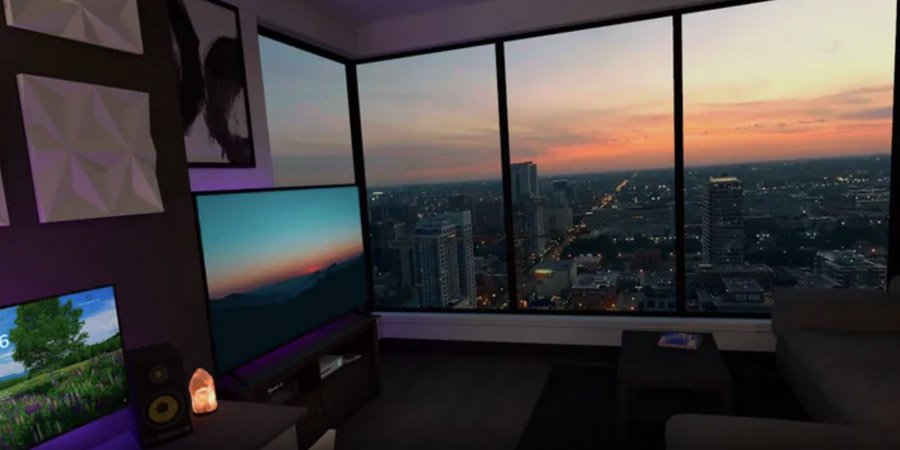
If you want a Virtual Desktop promo code, use VRCGUY. Guy Godin’s wireless PC app is £18.89 ($24.99) on the Meta Horizon Store at the time of writing. On a full-priced copy, VRCGUY should bring that to about £17.00 ($22.49).
Use this creator link: Virtual Desktop on the Meta Store. Claim the 10% banner if it appears. If it does not, type VRCGUY at checkout.
This is not a game. It is the paid pipe between a Quest headset and a computer.
What Virtual Desktop actually does
You put the headset on and sit in front of your PC’s screens, or you stream proper PCVR titles across Wi-Fi.
Watch films on a cinema screen. Browse the web. Use several monitors. Play flat games on a giant panel. Or fire up SteamVR / OpenXR games from a VR-ready Windows box without a Link cable in your ankle.
The store listing is picky about the network, and it is right to be. The PC should sit on Gigabit Ethernet into a 5 GHz router. The headset then talks to that router. A messy mesh and a laptop on hotel Wi-Fi is how people write one-star reviews.
It supports Windows 10 or 11, and macOS Catalina or later for desktop streaming. PCVR game streaming needs a VR-ready Windows PC. Bluetooth mouse, keyboard and gamepad are listed. Multi-monitor, 3D SBS / over-under, mic passthrough, 180/360 video from the PC, and remote internet connections if you enable UPnP.
You also install the free Streamer app on the computer. The Quest store tile is only half the kit.
Single user. Sitting, standing or room-scale. Comfortable. Controllers and hand tracking. About 1.1 GB. Quest 3, Quest 3S, Quest 2, Quest Pro and the wider Meta Quest line. Rated Everyone. Out since 21 May 2019. Version 1.34.22.0. Top Seller. Store rating 4.3 from about 10,000 ratings.
Air Link and Steam Link exist and cost nothing. Virtual Desktop is the one you pay for when you want more codecs, more knobs and a stream that does not feel like Meta’s spare option.
Features worth knowing before you pay
Wireless PCVR. This is why most people open their wallet. Half-Life: Alyx, VRChat from a tower, mods that hate Link. Your Wi-Fi and GPU still have to keep up.
A desktop in the room. Several screens, a theatre environment, films and 3D video. Plenty of owners never launch a VR game and still use it every night.
You have to set it up. Streamer on the PC, headset on the same network, a bit of bitrate tinkering. First evening can be fiddly. After that it is a reconnect.
Free rivals. Steam Link is fine if your library lives in Steam and you want zero extra spend. Air Link is Meta’s own wireless path. Virtual Desktop earns the £17 when those two annoy you.
Worth your money?
A VR-ready PC, a wired router and a Quest already collecting Steam titles is the sweet spot. Same if you want a private cinema and you are tired of wrestling Air Link.
No PC, shaky Wi-Fi, or a Steam-only habit you can already cover with Steam Link is a different shopping list. In that case the £18.89 tile is optional, not essential.
How to save with promo code VRCGUY
VRCGUY is an official Meta Creator Affiliate code. On eligible full-priced apps it takes 10% off.
- Open Virtual Desktop via this link on your headset, the Meta Horizon app, or a browser.
- Add Virtual Desktop to your cart.
- Claim the creator discount if the banner shows. Otherwise tap Add promo code and enter VRCGUY.
- Check the total before you pay.
Creator codes usually do not stack with Meta sales. The page is at full price today, so the code should be the one that bites. Then download the Streamer on the PC from vrdesktop.net.
Watch Virtual Desktop in action
Official Quest teaser from developer Guy Godin. Close to the clip length on the store page.
Frequently asked questions
What is the Virtual Desktop promo code?
VRCGUY. Use the link above and confirm the cart shows about 10% off.
How much is it in pounds?
About £18.89 full price, or £17.00 with VRCGUY.
Do I still need a PC?
Yes. The headset app is useless without a computer on the network.
Is Steam Link not enough?
For a lot of Steam-only play, yes. Virtual Desktop is the paid extra for quality, codecs and non-Steam launchers.
Which headsets?
Meta Quest 3, Quest 3S, Quest Pro, Quest 2 and other Meta Quest hardware listed on the page.
If you want wireless PCVR or a cinema screen and you are paying full price, use this link and make sure VRCGUY is on the bill.